

Prerequisite for gated models — We do not handle certain gated models in
“Get Started.” If you want to utilize certain gated models on Hugging Face,
please refer to the Hugging Face
documentation. Ensure you meet all requirements
specified there before proceeding with the gated models.
For non-gated quantized models, please refer to the relevant links provided below.
* https://huggingface.co/unsloth
* https://huggingface.co/casperhansen
* https://huggingface.co/TheBloke
For non-gated quantized models, please refer to the relevant links provided below.
* https://huggingface.co/unsloth
* https://huggingface.co/casperhansen
* https://huggingface.co/TheBloke
Try it on VESSL Hub
Try out the Quickstart example with a single click on VESSL Hub.
What you will do
- Fine-tune an LLM with zero-to-minimum setup
- Mount a custom dataset
- Store and export model volumes
Writing the YAML file
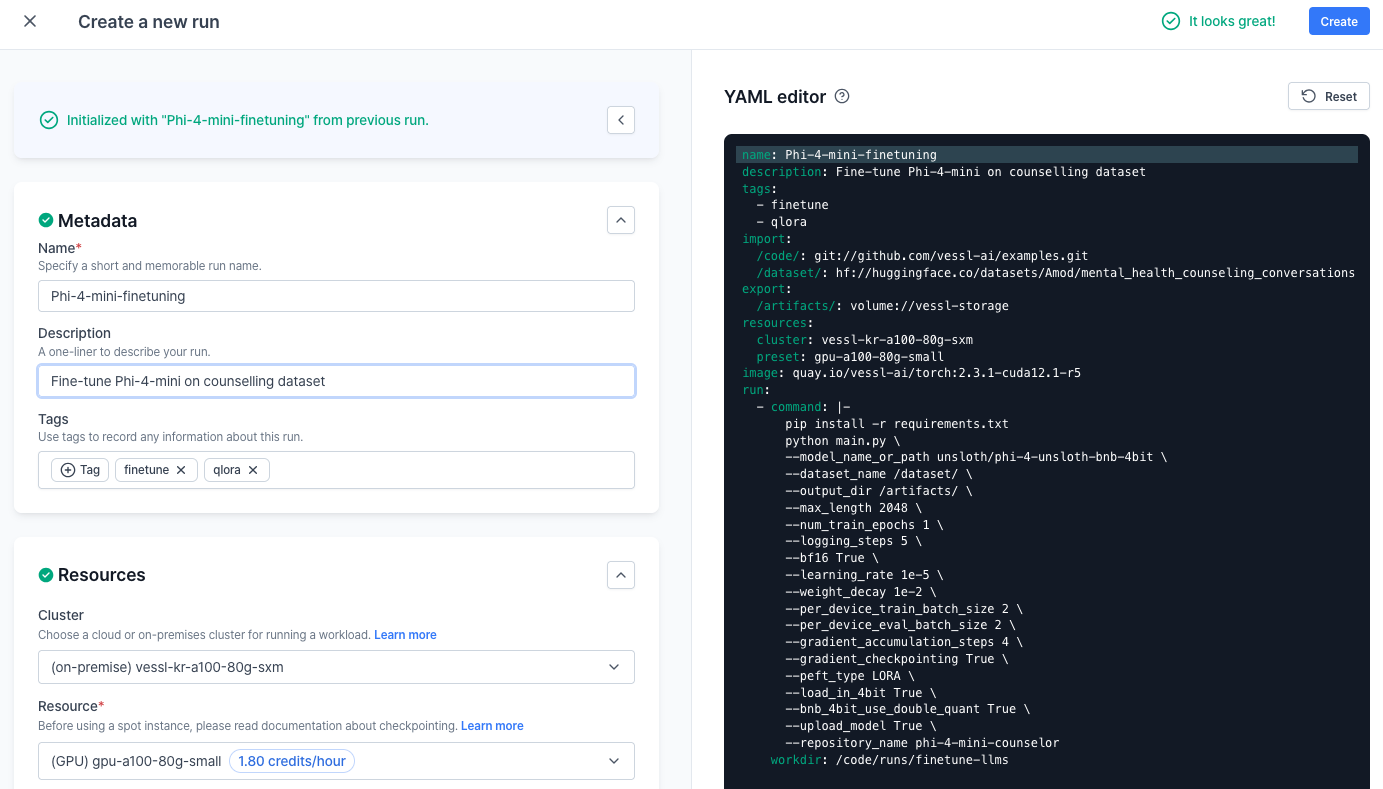
Let’s fill in thephi-4-fine-tuning.yaml file.
1
Spin up a training job
Let’s spin up an instance.
2
Mount the code and dataset
Here, in addition to our GitHub repo, we are also mounting a Hugging Face dataset.As with our HF model, mounting data is as simple as referencing the URL beginning with the
hf:// scheme — this goes the same for other cloud storages as well, s3:// for Amazon S3 for example.In this example, we are using mental health counselling conversations dataset hosted on Hugging Face.3
Write the run commands
Now that we have the code and dataset mounted on our remote workload, we are ready to define the run command. Let’s install additional Python dependencies and run
main.py.4
Export a model volume
You can keep track of model checkpoints by dedicating an export volume to the workload. Once training is finished, the trained models are uploaded to the artifact folder as model checkpoints.
Running the run
You can create a new run with VESSL CLI:vessl run create -f phi-4-fine-tuning.yaml
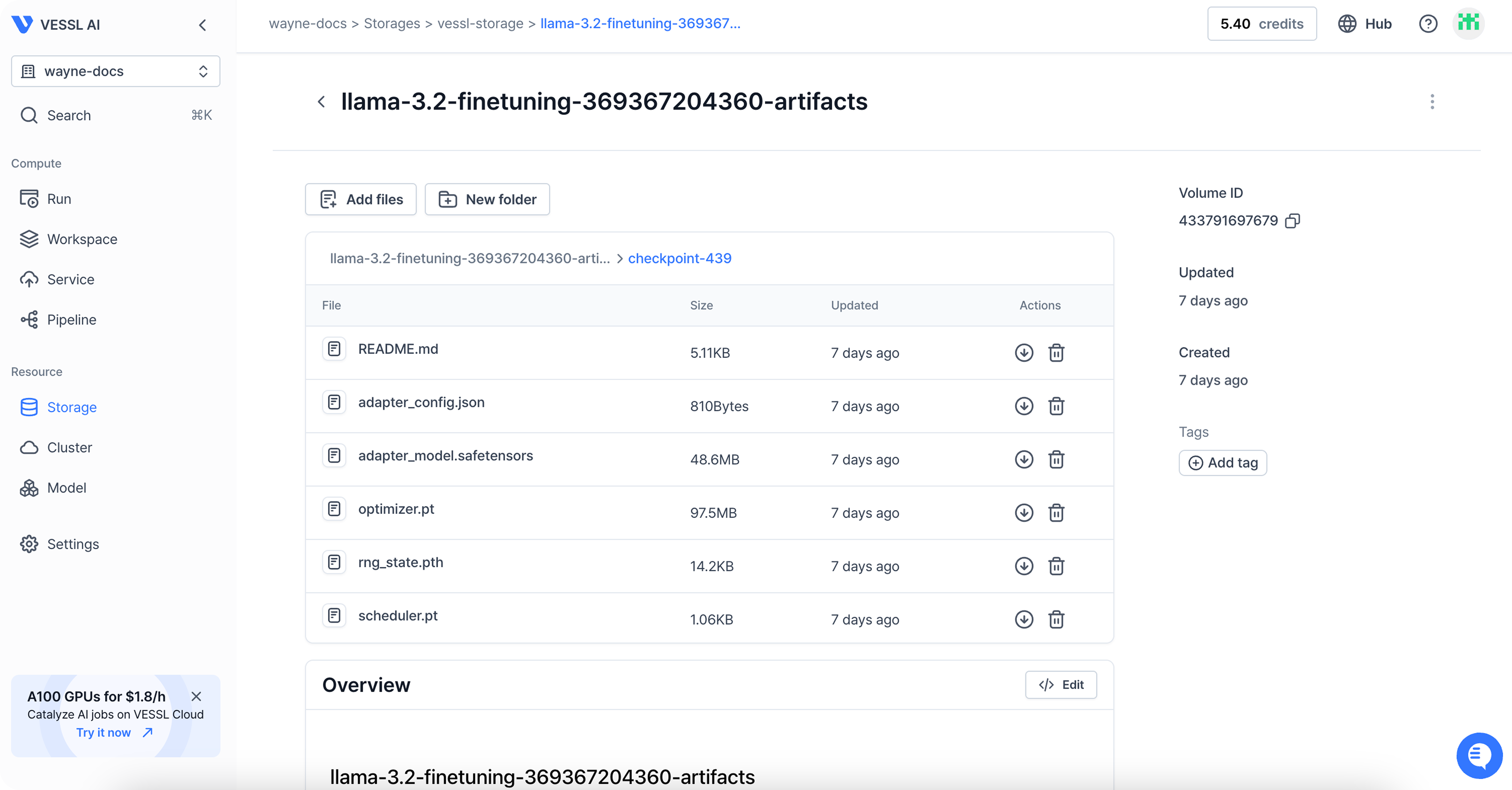
Once the run is completed, you can follow the link in the terminal to see the result of the run.
You can find the files under Storage.
Behind the scenes
With VESSL, you can launch a full-scale LLM fine-tuning workload on any cloud, at any scale, without worrying about these underlying system backends.- Model checkpointing — VESSL stores
.ptfiles to mounted volumes or model registry and ensures seamless checkpointing of fine-tuning progress. - GPU failovers — VESSL can autonomously detect GPU failures, recover failed containers, and automatically re-assign workload to other GPUs.
- Spot instances — Spot instance on VESSL works with model checkpointing and export volumes, saving and resuming the progress of interrupted workloads safely.
- Distributed training — VESSL comes with native support for PyTorch
DistributedDataParalleland simplifies the process for setting up multi-cluster, multi-node distributed training. - Autoscaling — As more GPUs are released from other tasks, you can dedicate more GPUs to fine-tuning workloads. You can do this on VESSL by adding the following to your existing fine-tuning YAML.
Tips and tricks
This example utilizes callbacks based on the Hugging Face Transformers library (see here). Therefore, metrics are automatically plotted, and no additional logging is required. VESSL supports integration with the Transformers library. By using the callback available in the Python SDK, metrics are automatically plotted, and users can choose to automatically upload models to VESSL Models if desired. For detailed usage, please refer to the Transformers integration page.Using our web interface
You can repeat the same process on the web. Head over to your Organization, select a project, and create a New run.What’s next?
Next, let’s see how you can serve and deploy your fine-tuned model to the cloud and create a text-generation API endpoint. For more details, refer to the updated Phi-4-mini deployment guide.Phi-4-mini-reasoning deployment
Serve & deploy vLLM-accelerated Phi-4-mini-reasoning
Enable Serverless Mode
Deploy with VESSL Service Serverless mode